SEO Configuration
Manage search engine indexing, social sharing metadata, and XML sitemaps.
Menu Access
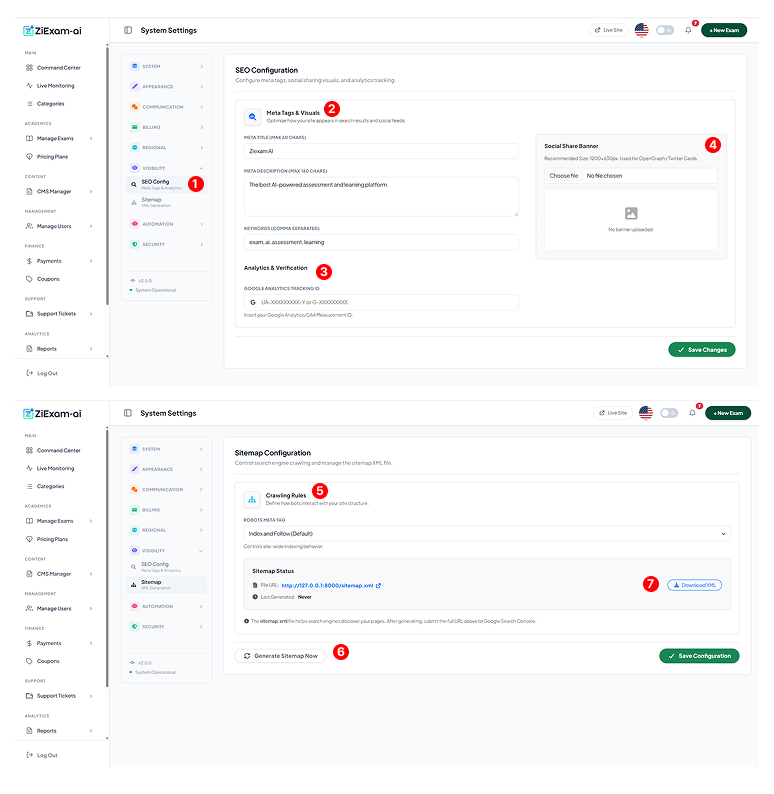
Navigate to Visibility > SEO Config. These settings control how your homepage appears in Google search results and when shared on social media.
Meta Information
Meta Title: The blue link text in search results. Keep it under 60 characters.
Meta Description: A summary of your platform (under 160 characters) to encourage clicks.
Keywords: Comma-separated tags relevant to your exams.
Social Share Banner
This image (Open Graph) appears when someone shares your homepage link on Facebook, Twitter, or LinkedIn.
Recommended Size: 1200x630px (JPG/PNG).
Analytics & Verification
Google Analytics: Paste your Measurement ID (G-XXXXXXXX) here to start tracking visitor traffic.
Verification Meta: Add ownership codes for Google Search Console or Bing Webmaster Tools.
Crawling Rules
Controls the robots.txt behavior.
Index and Follow: Allows Google to crawl and rank your site.
No Index: Hides your site from search engines (useful for private internal portals).
Sitemap Generation
Click Generate Sitemap Now to crawl your database and build an XML file of all public exams and pages. This helps Google discover new content faster.
Sitemap Access
After generation, the system provides a direct link (e.g., yoursite.com/sitemap.xml). Submit this URL to Google Search Console for optimal indexing.