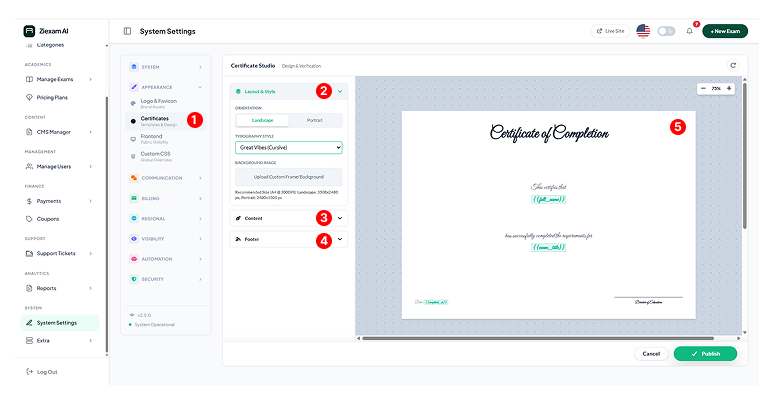
Certificate Studio
Visual drag-and-drop editor for designing automated exam certificates.
Key Feature: Dynamic Generation
The Certificate Studio is a powerful WYSIWYG editor. Designs created here are automatically populated with student data (Name, Date, Score) instantly upon exam completion.
Template Selection
Access the studio via Appearance > Certificates. You can create a global default template or assign specific designs to individual exams in the Exam Manager.
Layout & Style Controls
Orientation: Switch between Landscape (A4 Horizontal) and Portrait modes.
Typography: Select from premium fonts like Great Vibes (Cursive) for signatures or Roboto for body text.
Background: Upload a custom decorative frame or watermark image.
Dynamic Variables
Use the "Content" dropdown to inject smart placeholders.
{{full_name}} : Student's registered name.
{{exam_title}} : Name of the passed assessment.
{{score}} : Percentage achieved.
Footer & Signatures
Upload a digital signature image (PNG transparent) and add a verification QR code that links back to the result validation page.
Live Canvas
The preview area updates in real-time. You can drag elements to reposition them. The dashed grid helps in aligning text perfectly to the center or corners.