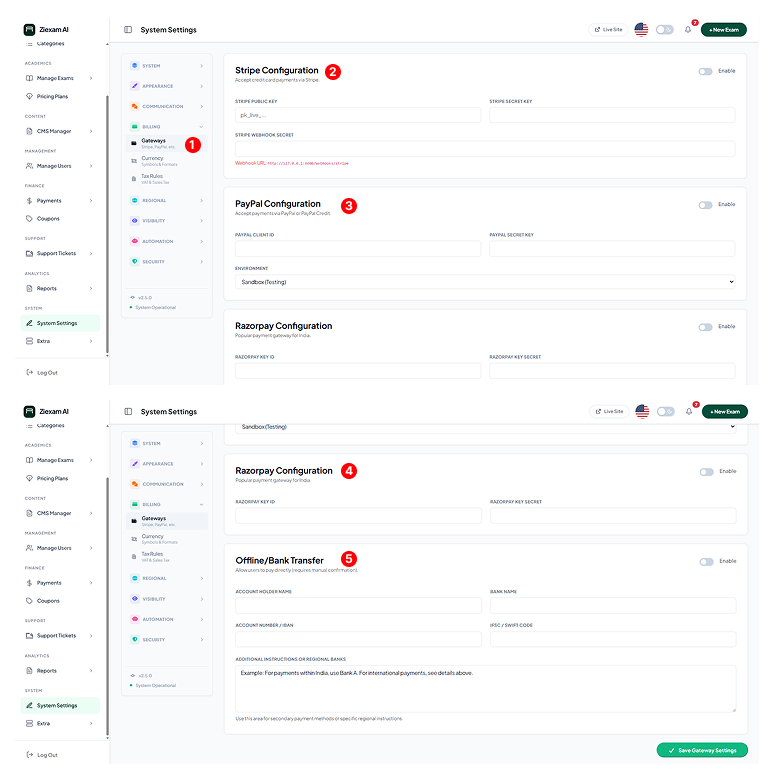
Payment Gateways
Configure online and offline payment methods to monetize your exams.
Stripe Configuration
1. Log in to your Stripe Dashboard.
2. Copy the Publishable Key and Secret Key.
3. Paste them into the respective fields.
4. Create a Webhook endpoint pointing to the URL shown in red text to handle recurring subscriptions.
PayPal Setup
1. Go to PayPal Developer and create a "Live" App.
2. Copy the Client ID and Secret Key.
3. Switch the "Environment" dropdown to Live when ready to accept real money.
Razorpay Integration
1. Access settings in your Razorpay Dashboard.
2. Generate a new Key Pair.
3. Enter the Key ID and Key Secret.
Note: Only supports INR currency.
Bank Transfer / Manual
Enable this for manual payments. Enter your Bank Name, Account Number, and Swift Code in the instructions box.
Workflow: Students upload a receipt -> Admin verifies it in "Finance > Payments" -> Admin approves transaction.