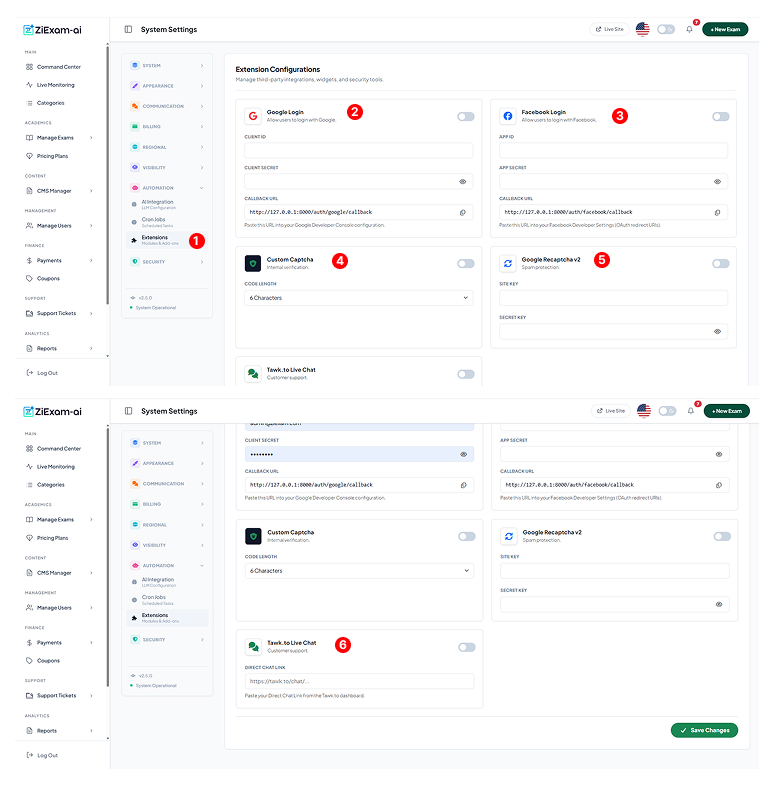
Extension Configurations
Manage third-party integrations, social logins, and security widgets.
Module Access
Navigate to Automation > Extensions. This centralized hub allows you to toggle and configure external services without touching the code.
Google Login
Enables "Sign in with Google".
Setup: Create credentials in the Google Cloud Console.
Callback URL: Copy the URL displayed here (e.g., .../auth/google/callback) and paste it into your Google Console's "Authorized Redirect URIs".
Facebook Login
Enables "Sign in with Facebook".
Setup: Create an App in Meta for Developers.
App Secret: This is a sensitive key; never share it. Like Google, ensure the Callback URL is whitelisted in your Facebook App settings.
Custom Captcha
A built-in, privacy-friendly alternative to Google.
Function: Generates a random alphanumeric image that users must type to register.
Length: You can adjust the difficulty by setting the code length (e.g., 6 characters).
Google reCAPTCHA v2
The standard "I am not a robot" checkbox.
Site Key: Public key used in the frontend HTML.
Secret Key: Private key used by the server to verify the response.
Note: Do not enable both Custom Captcha and reCAPTCHA simultaneously.
Tawk.to Live Chat
Adds a floating chat widget to the bottom right of your site.
Direct Chat Link: Paste your property URL from the Tawk.to dashboard.
Benefit: Allows you to provide real-time support to students directly from the exam portal.