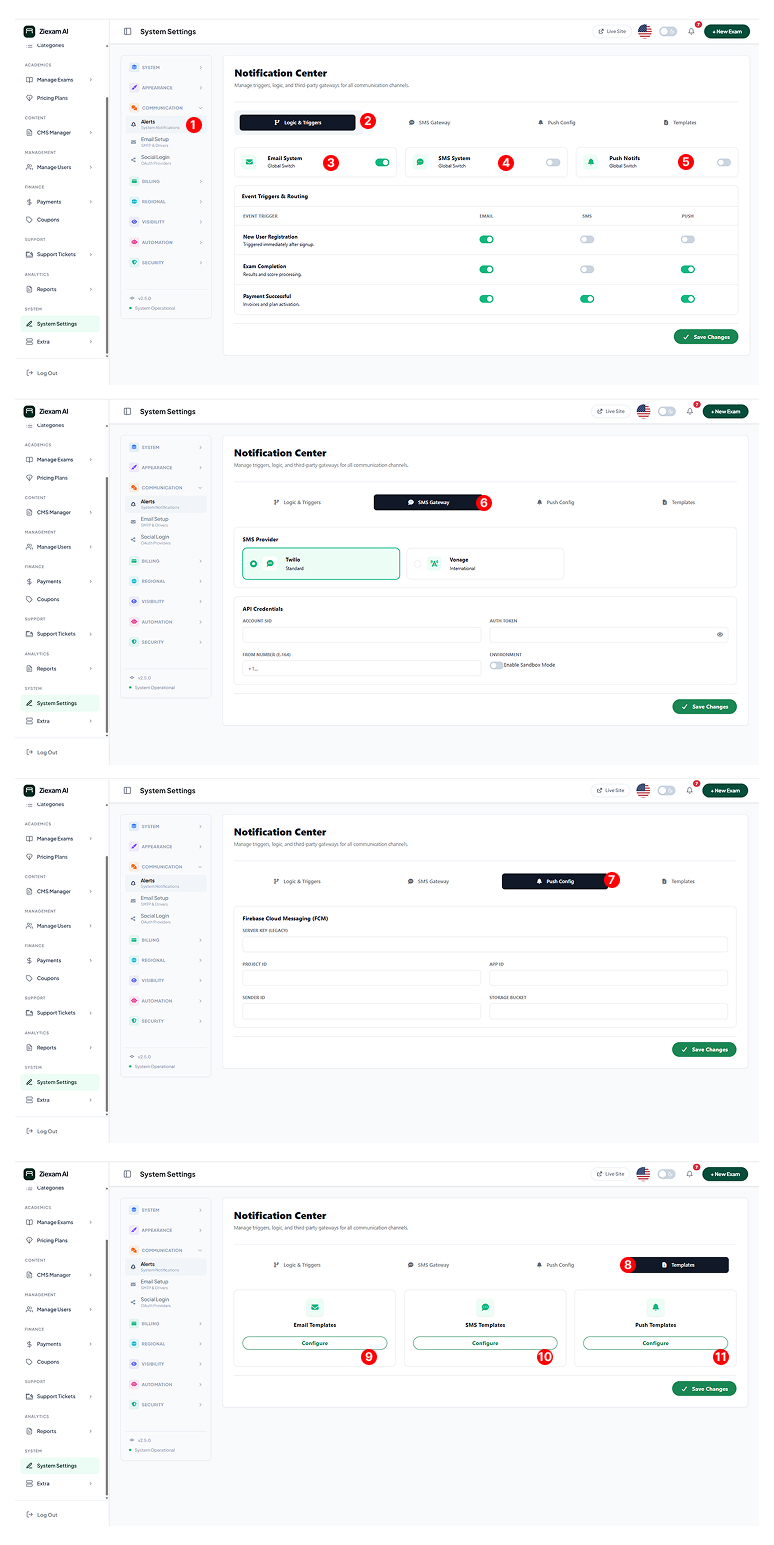
Notification Center
Centralized hub for managing automated system emails, SMS, and push notifications.
Menu Access
Navigate to Communication > Alerts. This dashboard is divided into 4 tabs to handle logic, gateways, and content templates separately.
Master Tabs
Use the top navigation bar to switch between defining When to send (Logic) and How to send (Gateways/Templates).
Global Channel Switches
Master toggles for the entire platform.
Email System: If OFF, no emails will ever send.
SMS System: Controls all text messaging features.
Push Notifs: Enables browser/firebase alerts.
Provider Configuration
Select your SMS provider (Twilio, Vonage, or Custom API). Enter your Account SID and Auth Token.
Note: Sandbox Mode simulates sending without charging credits.
Firebase FCM
Paste your Firebase Server Key and Project ID here to enable real-time browser notifications for students taking exams.
Template Manager
Customize the actual text sent to users. The system separates templates by channel (Email vs SMS).
Email Templates
Click Configure to open the WYSIWYG editor. You can use shortcodes like {{name}} or {{exam_link}} inside the email body.
SMS Templates
Keep these short (under 160 chars) to avoid extra charges. These are plain text only.