Tax Configuration
Automate VAT, GST, or Sales Tax calculations at checkout.
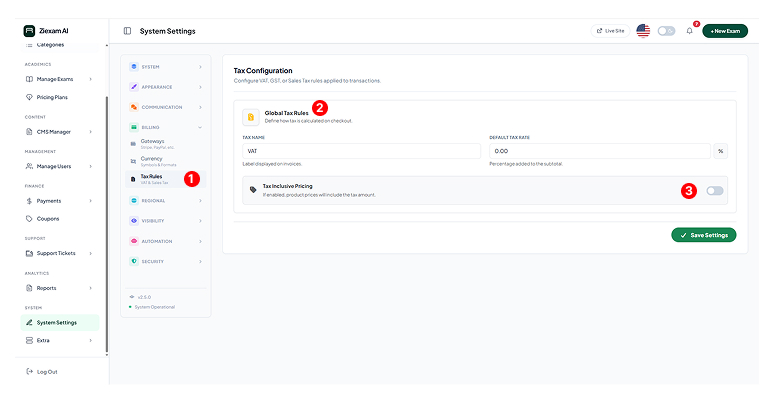
1
Menu Location
Navigate to Billing > Tax Rules. This feature is optional; disable tax by setting the rate to 0% if not applicable.
2
Global Tax Definition
Tax Name: The label displayed on invoices (e.g., VAT, GST, Sales Tax).
Default Rate: The percentage added to the subtotal (e.g., 20.00).
3
Inclusive Pricing
Toggle ON: The product price includes tax. (e.g., Price $100 = $83.33 + $16.67 Tax).
Toggle OFF (Exclusive): Tax is added on top of the product price. (e.g., Price $100 + $20 Tax = $120 Total).
Click image to zoom