Currency Settings
Define the global currency and formatting rules for your store.
1
Menu Access
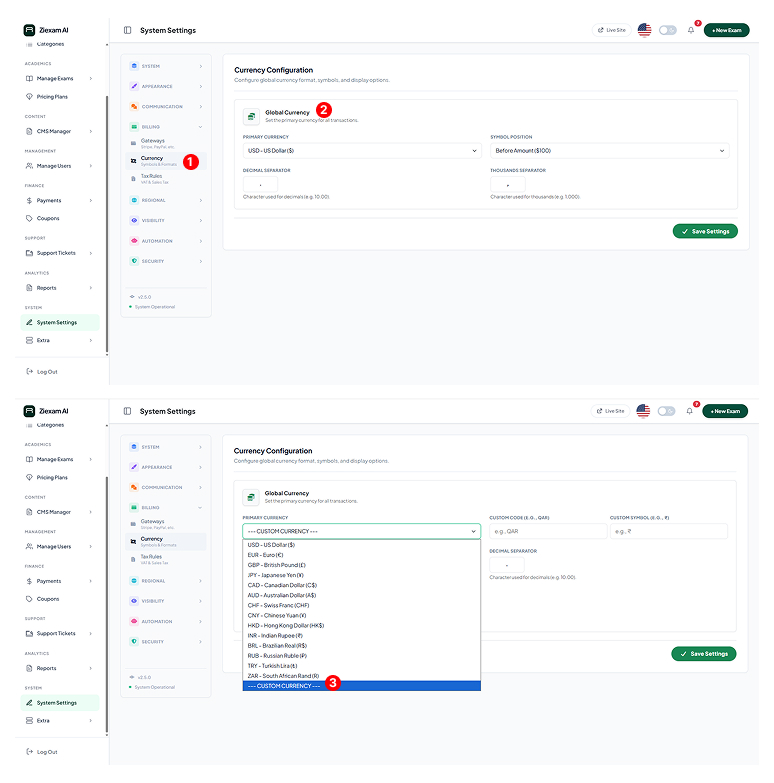
Navigate to Billing > Currency. Changes here affect all pricing displays, invoices, and payment gateway requests.
2
Standard Currencies
Select from the predefined list of major currencies (USD, EUR, GBP, INR, etc.). The system automatically sets the correct symbol ($) and ISO code.
3
Custom Currency
If your local currency isn't listed, select "--- Custom Currency ---". This unlocks input fields where you can manually define:
Name: E.g., Qatari Riyal
Code: E.g., QAR
Symbol: E.g., ر.ق
Critical Note
Ensure your chosen Payment Gateway supports the currency you select here. For example, Razorpay only accepts INR.
Click image to zoom