Exam Management
Create, schedule, and manage assessments using AI or manual tools.
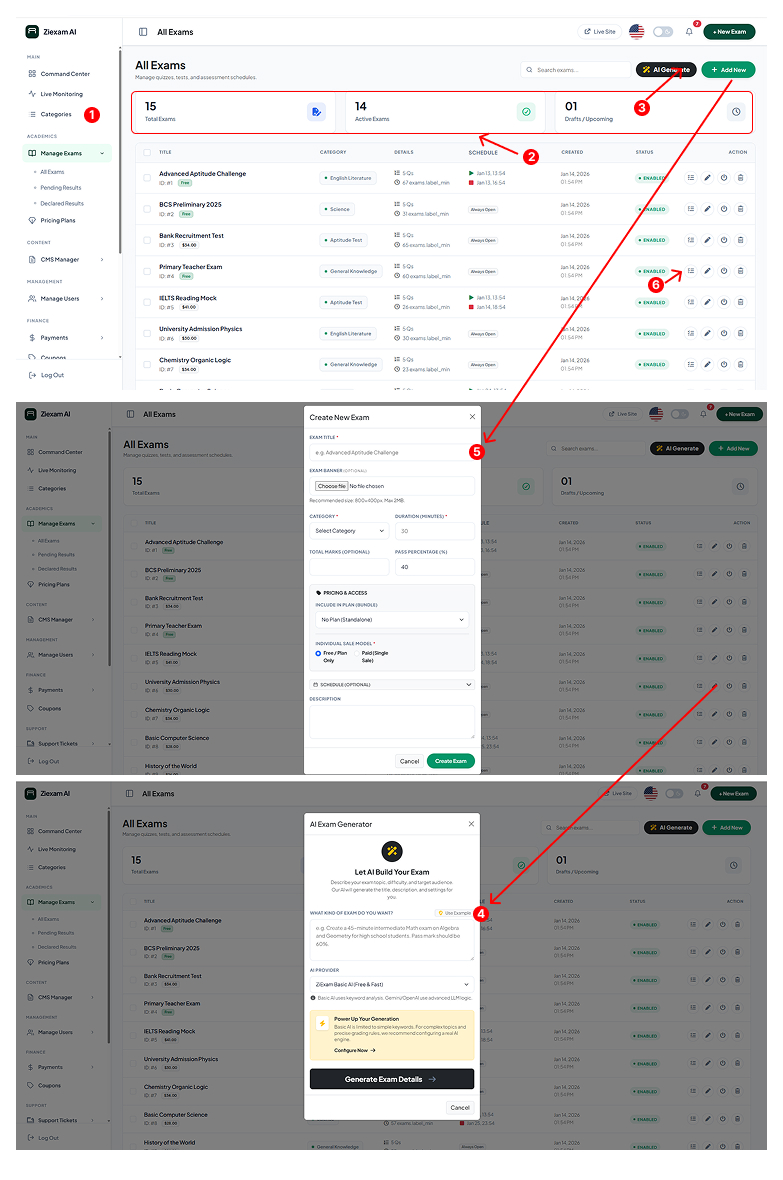
1
Exam Overview Stats
The top ribbon displays key metrics: Total Exams, Active Exams (currently running), and Drafts/Upcoming exams.
2
Exam List
A sortable table showing all exams. You can see the Category, Question Count, Schedule status, and current State (Enabled/Disabled).
3
AI Builder / Add New
Use the "AI Generate" button to auto-create an exam based on a topic, or "Add New" for manual setup.
4
AI Exam Generator
The AI modal allows you to type a prompt (e.g., "Create a 45-minute Algebra test"). It automatically generates titles, descriptions, and configurations.
5
Manual Creation Modal
Set specific details manually: Exam Title, Category, Duration (minutes), and Passing Percentage.
6
Actions
Use the action icons to Edit details, Manage Questions, view Analytics, or Delete the exam.
Click image to zoom