User Profiles
In-depth user analysis, security logs, and profile management.
Profile Breakdown
Identity & Plan Card
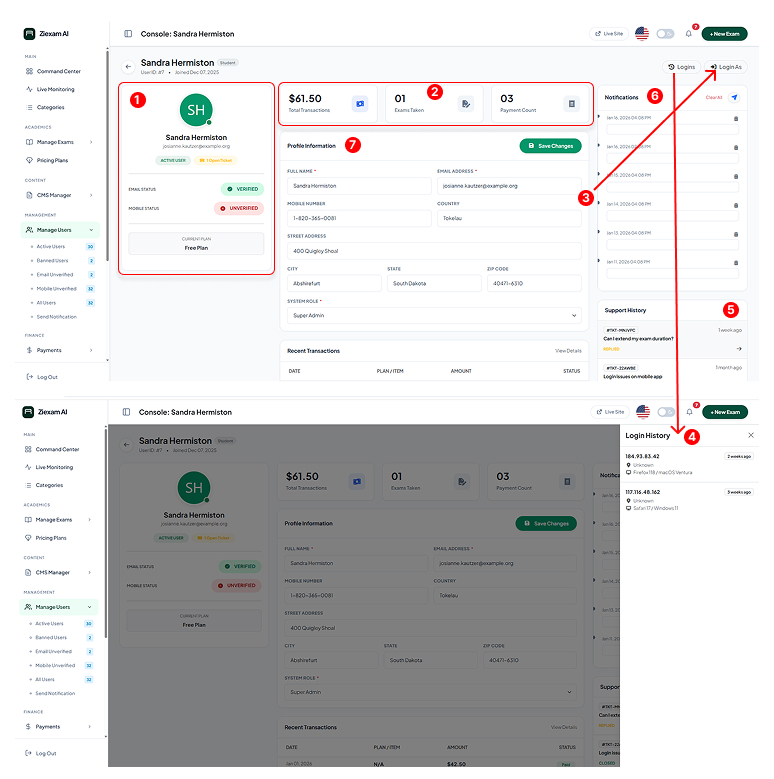
This card summarizes the user's current status. It displays their Avatar, System Role (Student/Instructor), and Current Subscription Plan. It also highlights verification status (Email/SMS) in Green (Verified) or Red (Unverified).
Activity Statistics
Three key performance indicators for the user:
Transactions: Total revenue generated by this user.
Exams Taken: Count of completed assessments.
Payments: Number of successful checkout events.
Administrative Actions
Two critical security tools:
Login As: Instantly impersonate this user on the frontend to debug issues.
Logins: Toggles the view to the Security Log tab.
Login History Log
A security audit trail showing the last 10 sessions. It records the IP Address, Browser type, OS, and timestamp. Use this to detect suspicious account sharing or unauthorized access.
Support History
This tab displays a timeline of all Help Desk tickets raised by this user. It allows the admin to quickly reference past complaints or technical issues the student has faced.
Notification Log
A record of all system emails and SMS messages sent to this user. This is useful for verifying if a student actually received an exam invitation or password reset link.
Profile Information Form
The main editing area. Admins can update personal details, change the password, modify the address, and crucially, click "Save Changes" to apply updates immediately to the database.